
Step 4: Launching
To actually launch and then play Living Skyrim, follow these steps:
- Open Mod Organizer 2: Navigate to your Living Skyrim folder and launch the included copy of Mod Organizer 2.
- Select Living Skyrim: In the top-right corner, select
Living Skyrim [SKSE]from the dropdown. - Start the Game: Click on the
Runbutton.

The dropdown and Run button.
- Update Game Registry: If prompted, confirm the game’s registry path update. If you’re not asked, move to the next step.
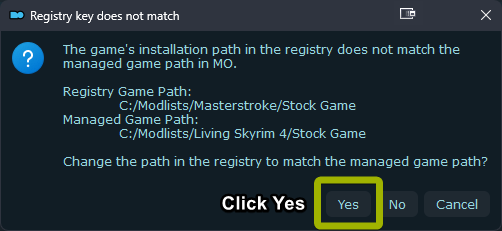
Registry popup, click Yes when prompted.
- Shortcut Option: For convenience, create a desktop shortcut using the
Shortcutbutton below theRunbutton. - Start a New Game: Once Skyrim starts, choose to create a new game.
- Create & Name Your Character: Choose your character’s appearance and name.
- Wait for Mod Initialization: After gaining control of your character, wait. Mods will initialize, showing in the top-left. Wait until no more mods appear.
Warning
Do not load a previous save or one from another modlist. This can corrupt the save.